

UrbanPro
true
default_background

Learn Advanced VBScript from the Best Tutors

  • Affordable fees
  • 1-1 or Group class
  • Flexible Timings
  • Verified Tutors

Search in

Excel Tip 1: VLOOKUP to pull left column values

Karthik Dale
17/05/2017 0 0

Hi,
Most of us know that using Vlookup function we can get the right column values, however by using Choose function in Vlookup table array, we can pull left column values as well. In the below screenshot lookup value column is not left most even though Vlookup is able to get the Product Name or Branch details
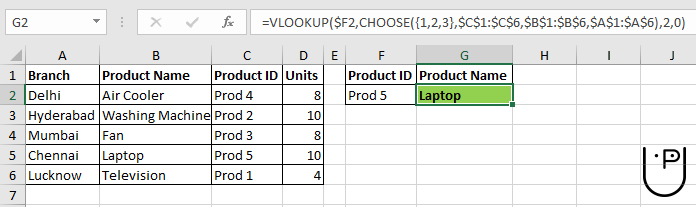
 

Note1: Choose function 1st argument contains flower brackets

Note2: If you change the column index number to 3 then it will populate branch details.

Hope it's a helpful tip. Will catch you in my next tip

0 Dislike
Follow 0

Please Enter a comment

Submit

Other Lessons for You

Excel Database Functions List
Excel Database Functions List Database Functions DAVERAGE Calculates the average of values in a field of a list or database, that satisfy specified conditions DCOUNT Returns...
U

Uma Sahu

0 0
0

Hidden Gems Of MS Excel - Clipboard
Q) Has it ever happened:1) You copied something2) (did not paste) Performed another actione.g. typed something OR deleted something3) Next, tried to paste, however, instead, received an error sound Clipboard...

PowerPivot For Excel
PowerPivot is an add-in for Microsoft Excel 2010 that enables you to import millions of rows of data from multiple data sources into a single Excel workbook, create relationships between heterogeneous...

How Lookup function to replace Nested If statement
Nested If statements are complicated to type down and include many parameters. The best method to replace them is to use the lookup function. Using the lookup function shortens the formula at a considerable...

HERE TODAY WE WILL USE THE SUMPRODUCT FUNCTION
A B C D E 1 SR.NO NAME SERIES _1 SERIES_2 TOTAL AMOUNT 2 1 VEERU 2 2 4 =sumproduct(D2,E2) 3 2 MAHIPAL 4 6 24 =sumproduct(D3,E3) 4 3 NIHSA 6 8 48 =sumproduct(D4,E4) 5 4 UMA 10 2 20 =sumproduct(D5,E5) 6 5 SHANKER 12 3 36 =sumproduct(D6,E6) 7 6 MAHESH 7 3 21 =sumproduct(D7,E7) 8 7 KAPIL 8 2 16 =sumproduct(D8,E8) ...

Looking for Advanced VBScript Training?

Learn from Best Tutors on UrbanPro.

Are you a Tutor or Training Institute?

Join UrbanPro Today to find students near you
X

Looking for Advanced VBScript Classes?

The best tutors for Advanced VBScript Classes are on UrbanPro

  • Select the best Tutor
  • Book & Attend a Free Demo
  • Pay and start Learning

Learn Advanced VBScript with the Best Tutors

The best Tutors for Advanced VBScript Classes are on UrbanPro

This website uses cookies

We use cookies to improve user experience. Choose what cookies you allow us to use. You can read more about our Cookie Policy in our Privacy Policy

Accept All
Decline All

UrbanPro.com is India's largest network of most trusted tutors and institutes. Over 55 lakh students rely on UrbanPro.com, to fulfill their learning requirements across 1,000+ categories. Using UrbanPro.com, parents, and students can compare multiple Tutors and Institutes and choose the one that best suits their requirements. More than 7.5 lakh verified Tutors and Institutes are helping millions of students every day and growing their tutoring business on UrbanPro.com. Whether you are looking for a tutor to learn mathematics, a German language trainer to brush up your German language skills or an institute to upgrade your IT skills, we have got the best selection of Tutors and Training Institutes for you. Read more




